
The short version
I start from a Claude skill built from my past presentation threads, think about the audience, brain-dump everything into Claude and ask for a story before any slide, then I rework that story myself. Claude generates the deck in artifacts, I review it slide by slide with voice notes, run it out loud, redo it, move it to Google Slides, practice from the slides, record a run and listen to it on repeat. I start about a month ahead.
- Ask Claude to turn your brain dump into one story, step by step, before you ask for any slide: each step should lead to the next through a problem, a solution or a continuation.
- The first practice run is where the story breaks. Mine are usually way too long, something like 48 minutes for a 30-minute slot, and you see where the transitions don't make sense.
- Record a decent run and listen to it while you do other things. For my last AI Engineer talk, I practiced about twice but listened to my second run at least 10 to 15 times.
I spent the last year traveling from country to country to speak at conferences, and I’ve built a pretty solid system to prepare these talks. I wanted to share it, because I think it’s relevant to you too: everyone presents stuff, whether you’re a student in front of the class, giving a small presentation at work, or even in an interview.
It all comes down to selling yourself, or selling something the audience wants to hear about. And to be honest, it isn’t as simple as it sounds. You really need to work hard to make the presentation relevant to the person listening. That’s what I’ve optimized for over the past year, giving a dozen different talks at big conferences and more than a dozen online workshops.
So hopefully, you’ll leave this article with a very clear plan to directly improve your next presentation, whether you’re a developer, an AI engineer, or not technical at all. It’s just how I do it, with my best tips on how to present yourself, or basically how to give the best presentation possible, whatever the topic is.
If you don’t know me yet, I’m Louis-François Bouchard, CTO and co-founder of Towards AI. I do training and education for a living, so writing and giving talks is part of my job. And because we’re a small team, I really try to optimize every single part of my job. That obviously means bringing AI and AI systems into my workflows, but also learning how to present and how to teach, which means I’ve consumed dozens of books about storytelling and presentations in general. This article is all about the preparation, and how I go about a presentation.
You can’t wing a presentation
Just to be clear: you cannot wing a presentation. It requires work and human effort. You can’t delegate everything to Claude, and it requires practice and mostly your own time. You can’t avoid that. But if you’re ready to put in the work, this is my ideal workflow, in 13 steps.

The whole workflow: five steps to plan the talk, two to build the deck, six to practice it.
1. Build a presentation skill once
Since I’ve already given dozens of presentations, my first step was to build a proper skill: basically one Markdown file with everything I want and don’t want in a presentation. For me, it just meant prompting Claude and asking it to build the best skill possible from all my other Claude threads where we built presentations.
If you don’t have any threads about building a presentation yet, just write down everything you want and don’t want in a presentation: clean slides, one core idea per slide, one slide per minute of content, and tons of other rules like these that you really want.
It’s the best thing to have over time, so you don’t repeat yourself. But if you don’t have anything yet, just start prompting Claude and build your first presentation with the next steps.
A general version of my skill is public if you want a starting point: talk-decks, along with a prompt that builds your own version from your past Claude Code or Codex threads.

How my talk skill is organized today. Corrections I repeat move from FEEDBACK.md into SKILL.md. From my O’Reilly Skills Live slides, November 10, 2026.
2. Know the audience
The next step is actually yours. You need to think about the audience, whether it’s your boss, the interviewer or, when I’m speaking at the AI Engineer conference, mostly AI engineers: technical, applied people.
I try to think about why they’re there, what their background is, what they can and can’t understand, and what they want out of this talk, because this will drive the whole presentation from this point on. You need to adapt every presentation to the audience you’re talking to. What you want to share and what the audience is there to learn are two very different things, with very different goals, and the talk has to be about the second one.
3. Brain-dump everything into Claude
Once you have that in mind, I usually just brain-dump everything into Claude, telling it to use my presentation skill. I use Wispr Flow, a voice-to-text tool, to dump everything I know about the presentation: what I want to talk about, who the audience is, everything about the conference, the current title I submitted, the description. Everything I can think of, I dump it into Claude.
For example, if I’m going to AI Engineer, I know that everyone there knows Andrej Karpathy. So if he has a relevant tweet about exactly what I’m talking about, I’ll add a screenshot of that exact tweet to the slides, so everyone can relate to it. You really want people to relate to what you share.

The second slide of my AI Engineer NYC talk, October 13, 2026: a quote from someone everyone in that room knows, right where the problem starts.
So anything you can think of, you dump it in the prompt and ask Claude to use it in the presentation.
4. Ask for a story before any slide
Then, before building any presentation, the next step is to ask Claude to turn all your thoughts into one cohesive story, step by step, where each main step leads to the next through a problem, a solution or a continuation that makes sense.
Now, obviously, Claude is really bad at doing that. You will need to edit it. But I’ve seen that it usually builds a much better presentation than having fact A, fact B and fact C randomly put together. You really want a good story, end to end. And at this point, you want to save everything from this discussion into that skill, so you can reuse it and save time on your next presentations. The same goes for everything else in this article.
5. Rework the story
Once you have that plan, your work starts. You reorganize it, trying to fit it into something that sounds like a real story.
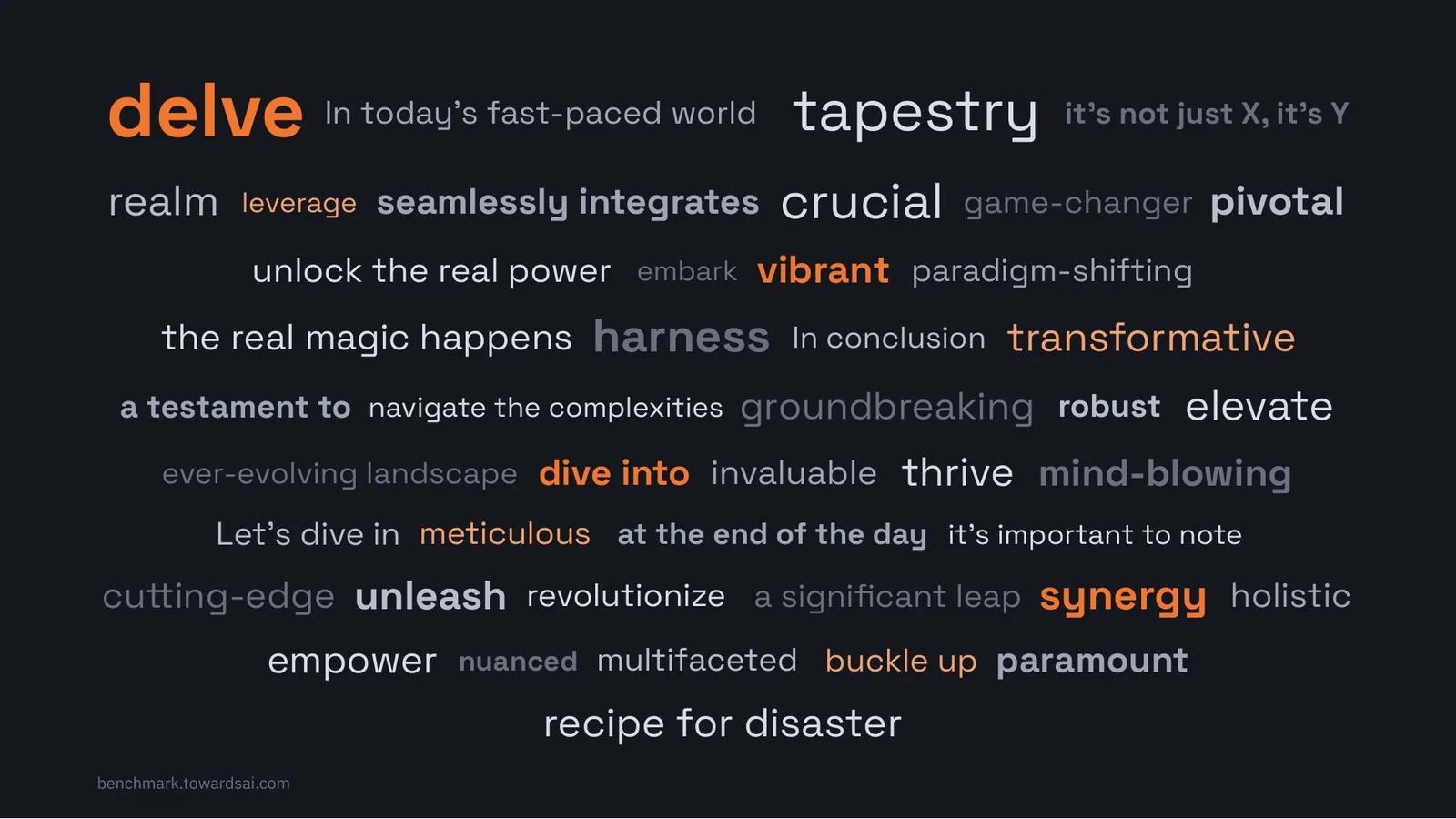
For example, take my benchmark, ToneBench. It’s about analyzing creative writing, and what I want to share is how to build a benchmark and the results from it. But to talk about creative writing, I first want to share a core problem, the reason I’m even working on this benchmark. So I start at a much higher level, talking about slop and annoying LLM writing. I try to make it super funny from the first slide. The first few slides, and the first five to thirty seconds, are extremely important.

The first slide of my AI Engineer NYC talk: the slop words and phrases we all recognize from LLM writing.
You want people to laugh, or to be really interested in what you’re saying. You really don’t want to start by presenting yourself. You want to do that much later, in a way that only builds your credibility.

The plan of my AI Engineer NYC talk, where each line leads to the next. From my O’Reilly Skills Live slides, November 10, 2026.
So I try to lead from the top of the funnel, something very general like a problem, down to my current solution, and to keep it relevant to the audience at all times. I iterate on the plan, with this sort of loose system where one idea leads to the next in a way that makes sense. By then, you should have a decent, relatively final plan.
6. Generate the deck
But you have no idea if it fits the 30-minute limit you have, or whatever length you need to submit. So the next step for me is to take that plan and just ask Claude, “Build me a deck.” On my end, it uses my skill and generates slides that I already like. But ideally, at this step, you want to give every possible detail on what you want your slides to look like and not look like.
For example, don’t add subtitles below the titles or put tons of text everywhere, two things Claude really likes to do. On my end, it’s keep it clean: bullet points, concise information, and useful visuals only. A visual really needs to earn its place. Then Claude generates a very big deck that looks really nice, and a lot of people actually stop there.
But that’s where my work actually starts. We’re still in Claude, and you can do the same in ChatGPT or on any other website. I only work in artifacts at this point, because you will iterate a lot.
7. Review every slide with your voice
My first step is to check all the slides and figure out what is complete garbage. And trust me, on the first generation, the majority of the slides and the story are usually really bad. So you want the human touch there.
Then I go through each slide one by one with Wispr Flow, so just voice to text, and talk through all my comments and thoughts as if I was reviewing someone else’s work. So I’ll say something like, “Slide one is really bad, just remove it. Between slide two and slide three, add another slide saying that. Move slide four to slide seven. Bring slide 32 to slide four.” You reorganize everything in a way that makes sense to you, and you remove all the slop, all the things that seem generated and irrelevant.
8. Do a first practice run
Then the next step is to do a first practice run. It gives you the length, and for me it’s way too long every time. For a 30-minute talk, I would probably have something like 48 minutes. You’ll also see that the story really doesn’t make sense. That’s what Claude, and any AI, really sucks at: a proper end-to-end story that makes sense in a talk.
So this is where you’ll change everything, because a transition didn’t make sense, or you didn’t know how to go from one slide to the next. To me, it’s really important that one slide naturally leads to the next. If you don’t have that, the presentation won’t be interesting and won’t be easy to follow.
A single friction point in the presentation will just make you lose the people listening. Unless you’re Karpathy, Elon Musk or another really big name, they aren’t there to hear from you specifically. If they’re there, they want to learn something. They want to find value. And if they’re bored, they’ll either leave, open their phone, or their brain will just completely disconnect.
You don’t want this to happen, and there are a few things you can do about it. As I said, you want the first five to thirty seconds to be really good: really funny, really interesting. Then, ideally, I like to insert a joke or something funny every three to four slides, to keep people listening, or even to bring back some of the people who stopped listening, because it was actually funny and they keep listening from there.
9. Redo the slides and run it again
After that first run, I send all these changes to Claude in one big voice note and ask it to redo all the slides. Then I do a second run, a second practice. Hopefully, it’s closer to 35 or 40 minutes instead of 48, and the story is much better. But I do the same process again, trying to optimize it a bit more.
10. Move to Google Slides
And finally, this is where I stop using Claude. Based on my preference, and you don’t have to do this, I ask it to move everything from the Claude artifact, or the ChatGPT HTML, or whatever you’re working on, to Google Slides, because I find it really reliable in presenter view for live presentations. You can do this with any system you want, or stay in HTML if you prefer.
I prefer Google Slides because I can edit everything manually, and I’m used to it. I can easily remove all the slop text that’s still there and keep moving slides around. To me, Google Slides is nice to share, nice to present with, and easy to customize as a user: I can add and remove animations without having to rely on prompting Claude to do things for me.
11. Practice from the slides
And I know I keep saying it, but this is where you’ll work the hardest, because you cannot delegate this part. This is where you have to practice. You have a decent final deck. Then, depending on how important the talk is and how good I am with the topic, I usually practice the same presentation from two up to even 10 or 15 times, so that I know I’m in the flow of it.
And by the way, that doesn’t mean rehearsing everything word by word. It just means having the slides and rehearsing the presentation from the slides. I don’t use any speaker notes. By the end, you want to be able to say with confidence that even if your cat comes in and distracts you while you’re giving the presentation, you can still get back on track and finish within the deadline, whether it’s 18 minutes or 30.
That’s my whole goal. You really want to master this talk, and to master the topic in general, and only practice can do this.
12. Record a run
Obviously, you want to rehearse as much as possible, but the one hack I’ve found is to record a run once it’s somewhat decent, usually the second or third one for me. I do it for two reasons.
First, to listen to myself and see if it’s really boring or not. You really need to record yourself giving the talk, or you’ll never see when something doesn’t make sense. I usually make tons of small tweaks and changes, especially to transitions, and to things I end up not wanting to mention because they’re totally irrelevant. That only happens after listening to the recording.
13. Listen to it on repeat
Second, I actually listen to that recording around a dozen times. But I do it when I go for a run, when I go to the gym, on the flight to the conference. It’s always while doing something else. Or just before sleeping, if I’m stressed.
And to be honest, it’s really useful. For my last AI Engineer talk, in New York in October, I practiced maybe two times, but I listened to my second practice run at least 10 or 15 times, and it went really well. I could almost give the presentation by heart, even with just two practice runs. So I think it’s a really nice hack that you should try.
Start a month ahead
Regarding the timeline, I usually start working on a presentation around a month before giving it, for one specific reason. If you don’t start early enough, you put a lot of stress on yourself to find the very good first five to thirty seconds that really hit, and to find the tweets and relevant quotes to add. It just takes time, and the ideas usually come while working on it, or while doing other things. When I do this, I’m really glad I started in advance.
But usually, it takes me a full day or two to build the entire presentation with the Claude workflow, move it into slides and do the first real practice run. After that, I can practice twice a day until the conference if I have the time, or between three and ten times depending on the topic and how comfortable I am with it.
Even then, I still want something decent a month or three weeks before, just to have time to find the good ideas to add to the talk. The practice itself happens a week or a few days before I give it.
More on the slides themselves
If you want to learn more about the actual slide creation process, and even about my Claude skills for creating these slides, I’d love to do a follow-up. Let me know in the comments if that sounds interesting. In the meantime, the talk-decks skill is public, and the slides from my O’Reilly Skills Live session on how I build talks with Claude go through the loop slide by slide.
FAQ
How do you prepare a talk with Claude?
In 13 steps. Plan: a presentation skill, the audience, a brain dump, a story from Claude, then my own rework of that story. Build: Claude generates the deck, and I review every slide with voice notes. Practice: a first timed run, a redo and second run, a move to Google Slides, practice from the slides, a recorded run, and listening to it on repeat.
What should a presentation skill for Claude include?
Everything you want and don't want in a presentation, such as clean slides, one core idea per slide and one slide per minute of content. I asked Claude to build mine from all my past Claude threads where we built presentations, and I save what I learn from each new talk back into it.
Why ask Claude for a story before generating slides?
Because a talk needs each step to lead to the next, through a problem, a solution or a continuation. Claude is really bad at this and you will edit it, but starting from a story usually gives a much better presentation than facts put together in a random order.
How do you review a deck that Claude generated?
I go through it slide by slide with Wispr Flow, a voice-to-text tool, and talk through my comments as if I was reviewing someone else's work, by slide number: remove slide one, add a slide between two and three, move slide four to slide seven. Then I send that whole voice note to Claude.
How do you keep the audience's attention during a talk?
Make the first five to thirty seconds funny or really relevant instead of introducing yourself, make every slide lead naturally to the next, and add a joke or something funny every three to four slides to bring back the people who stopped listening.
How many times should you practice a talk?
I practice from two up to 10 or 15 times, depending on how important the talk is and how well I know the topic, from the slides only and without speaker notes. I record a decent run, usually the second or third, and listen to it around a dozen times while running, at the gym or on the flight.
How early should you start preparing a talk?
I start about a month ahead, because the best opening and the right tweets and quotes take time to find. Building the deck and doing the first real practice takes me a full day or two. Most of the practice happens in the last week or the last few days.