
The short version
ToneBench gives every model the same task, writing a full script in my voice, five times for each of 10 tasks. Four judges score every draft blind on a detailed rubric, code adds length and slop checks, and the weighted result is a Writing Score out of 100. Head-to-head comparisons of those scores give the Writing Elo that ranks the leaderboard.
- Generate several drafts per prompt: the same model can write a great script and a weak one from the same prompt, so ToneBench scores five per task.
- Measure your LLM judges before trusting them. On the October 26, 2026 board, GPT-6.1 Sol gave OpenAI's drafts 4.1 more points than the other LLM judges' scores predict.
- For writing at scale, try about ten cheap drafts merged by a strong judge, one to three LLM review rounds, and always a human review.
Can you read an AI-generated script out loud without fully cringing? That’s what I wanted to answer with ToneBench, the writing benchmark I presented at the AI Engineer conference in New York in October 2026. Here’s exactly how it works, what it measures, and as many details as possible on how I built it, so that you can hopefully learn from it and improve your next evals. I’ll walk you through the whole benchmark and my best tips for working with LLM judges.
To be fully transparent, Lucid sponsored the video this article comes from, just to showcase how Lucid works. But the article is about the benchmark: the best insights for building evals that we got out of it, and how to write better with AI.
If you don’t know me, I’m Louis-François, CTO and co-founder of Towards AI, where we build AI solutions and train AI engineers.
A board drawn by Claude in Lucid
To make the visuals for this article and its video, I used a really cool tool, Lucid. I asked Claude to analyze the whole benchmark repo and visually build the entire presentation for me, so that I don’t have to do anything. Of course, I also gave it more context and brain-dumped what I wanted to cover.
All of it was made with just a few prompts, Claude Code and the Lucid MCP server. The visuals are really cool, and everything is customizable. I can zoom in, and we can comment on any part to ask for changes, and Claude can reply directly and make them.
Funnily enough, I made this diagram back in 2016, when I was in university. It covers some basic steps of an assembly course. So it’s kind of crazy to me that ten years later, Lucid reached out to me for a partnership on a video, so that I could showcase their agentic tools and how Claude can build with Lucid easily to visualize things and communicate with your team.

My oldest Lucid diagram, created on October 23, 2016. Shown at 1:03 in the video.
And I thought it was the perfect opportunity to show how I built the benchmark and all the steps inside it. There are tons of cool features: you can zoom in on each of the sub-presentations, and Claude created small buttons to go to the next step, and the next one, and the next one. It’s really convenient, and you can customize every single piece of it. You can really do anything with Lucid.
What slop is made of
Quick context if you haven’t seen my release of the benchmark: it’s about helping to stop slop. Slop starts with the overused words we all know, like “delve” or “seamlessly.” But the other parts are, in fact, much worse.
Worse than the slop words, slop text is usually too general. It says “most teams,” “most projects.” Unfortunately, I’m even guilty of doing that on LinkedIn myself, but to be fair, that’s the LinkedIn meta. I’ve learned from it, and I really try to be as specific as possible now.
Even worse than sloppy words and being general, a lot of the time, generated text says nothing. It’s just a bunch of nice words with hype, all stitched together. It’s really annoying to read and work with, especially when a teammate sends you a sloppy artifact they haven’t even reread.
Worse than saying nothing, it repeats itself a lot. If you work with Claude a lot, you know it repeats itself. You just want the outcome, to know what it did, but it keeps repeating the same thing multiple times.
Even worse, it hallucinates, as you know, so you can’t fully trust what it generates. And lastly, the worst thing for me: it has the wrong tone, or no tone at all. It talks like everyone, or like no one. It definitely doesn’t talk like me.
So the whole goal of ToneBench is to try to measure this sloppy writing, this creative writing: to measure if an AI system can sound like me, like my video scripts, like my writing style.

Part 1 of the board: the six ingredients of slop, sorted by Claude from the transcript of my AI Engineer talk. Shown at 2:18 in the video.
Everything on this board was built with Claude Code, but it all shows what’s actually implemented in ToneBench.
Setting up Lucid in Claude Code
If you want to replicate this setup, it’s really easy to do with Claude Code, in your repo. I just asked Claude to install it, but you only need the claude mcp add command to add Lucid:
claude mcp add --transport http lucid https://mcp.lucid.app/mcpThen type /mcp, pick Lucid, open your browser, sign in, and that’s it. Lucid’s guide to the Lucid MCP server has the details.

From there, Claude can manage everything in Lucid for you and build these visuals easily. And of course, you can use it in ChatGPT, Cursor and a bunch of other tools, since it’s just an MCP server that all of them can connect to.
Just to test it, I asked it to find my oldest document on Lucid, and it was the 2016 diagram you saw above.
Reviewing the board with comments
From there, I asked Claude to build the whole thing. I iterated on an artifact, a web page Claude builds that I review and comment on, with access to Lucid and the script, so that I could get all the different parts clearly designed. I commented on it directly, just like you could with your team in Lucid, but here with Claude.

The review page: keep, revise or remove each chart, with feedback for Claude. Round 5, November 1, 2026. Shown at 4:42 in the video.
So it’s direct iteration with Lucid and Claude artifacts, with Claude reading my comments and doing multiple rounds to improve the visuals.

My comment on the board, and Claude’s reply in the same thread after it added the five-box version. Shown at 4:52 in the video.
How ToneBench works
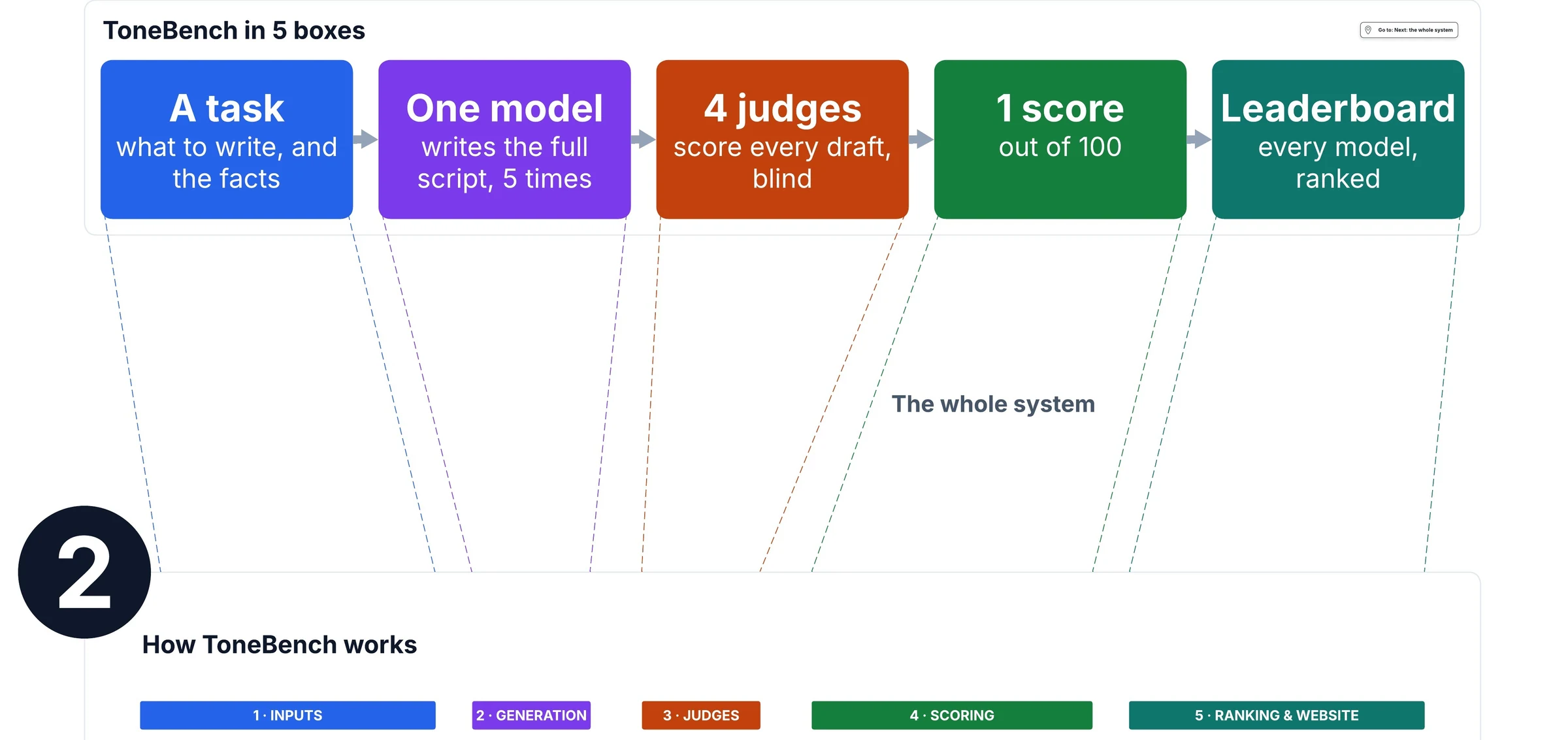
Back to the board: what does ToneBench do and measure, exactly? It’s really simple. We take a task, which here means writing a script in my voice. We ask the model to do it, then we judge it, give it a score, and add it to the leaderboard.
We do that for every single model, and we don’t have just one task, but ten different writing tasks. As the board shows, each model writes five drafts per task (more on that very soon), rated by four judges: Claude Opus 5.5, GPT-6.1 Sol, GLM 5.3 Flash and Jev 1.13 (the panel as of the October 26, 2026 board).
I added Jev recently, and I could do a whole video on Jev. If you’re interested, let me know. Then we average the scores, calculate a Writing Score, and publish it on the website. I’ll go through this whole process from left to right, step by step, and share exactly what we implemented and how.

Part 2 of the board: the whole system. One configuration, one model at one effort level, means 50 drafts and 200 judgments. Shown at 5:09 in the video.
To talk about scale: with ten tasks and five drafts each, every model has fifty drafts, which means two hundred judgments with four judges. That’s a lot of tokens, since each task is a long script, some of them about twenty minutes of reading. For the 141 configurations on the October 26, 2026 board, it adds up to about 1.6 billion tokens, in and out.
How a model writes one script
So what does the model that writes the script see? It gets my entire voice guide: how I write, how I talk, examples from my different scripts, and tons of tips on what I like and don’t like. Same thing for the storytelling guide, which is as detailed as possible on how to write properly: active sentences, keeping emotion throughout the text and letting it evolve, having a story end to end, all this stuff.
It also gets all the directions on what to generate and how: a full brief, and a full research document with citations to use, which we also use to measure the hallucination part.
Then all of this is fed to the model, and five drafts are generated and rated.

Part 3 of the board: the same inputs for every model, each box drawn to its word count. The model writes closed-book: no tools, no web search, and it never sees my final script. Shown at 6:30 in the video.
Why five drafts
We generate five drafts to measure intra-model variability. This is one thing Claude wouldn’t have suggested. Based on my background doing evals on tons of AI systems before this, I decided to measure the variability between generations from the same model and the same prompt, just to see if they generate the same thing.
And as you can see, they don’t, at all. Grok 4.7, for example, has a very big variance between generations, meaning it can generate a really bad script and a really good script totally at random. Compare that to Claude Opus 5.5, which is really consistent.
That’s not because of how our judges rate. It’s purely generation quality, because I also optimized our four judges so that this doesn’t happen. In any case, it’s really good to measure this variability for the same task repeated, just to see if it’s consistent, especially when you pick a final model for production.

Same model, same prompt, same script, five times. On the October 26, 2026 board, Grok 4.7 (high) ranks 28th with its best drafts and 62nd with its worst, while Claude Opus 5.5 (xhigh) stays first or second. These ranks sort configurations by average score, not by the leaderboard’s Writing Elo. Shown at 7:11 in the video.
How one draft gets its score
From there, we generate the five drafts. Here’s how we rate them, and what the judges base the final rating on. The prompt is quite big: around 20,000 words.

What a judge reads to score one draft, each part sized by its word count: 20,382 words for this draft, and 13,402 to 33,033 across all 7,050 drafts. Shown at 8:24 in the video.
In short, we have eight different metrics with different rules, and each metric has tons of examples of what we’re looking for: what a good result looks like, what a bad result looks like. The judge also has access to the draft we just generated, so that it can judge it, plus further examples so that we can best guide it and calibrate it on real past scripts that we have.
Then our judges pick a score for each metric. First, the LLM judges identify quotes that best represent the current script. Then they give it a score and explain why the score fits. We do that for all eight metrics, plus two scores computed in code: the length, where we count the words to know if the draft respects what we asked for, and a slop score that uses EQ-Bench’s slop lists and our own slop scoring method.
Lastly, we calculate a weighted sum of all these metrics based on importance. The judges’ slop rating is folded into that slop score, so the Writing Score weighs nine metrics in the end. That’s for one judge. We then average all our judges, and do the same for our five different drafts.

One real draft, step by step: Claude Opus 5.5 (xhigh), draft 4 of 5 on one of the ten tasks. 88.18 for one judge, 88.86 for four judges, 87.91 over five drafts, and a Writing Score of 85.83 over the ten scripts, second of 141 configurations on the October 26, 2026 board. Shown at 8:53 in the video.
The Tone & Voice ladder
To come up with the score, we actually have six main categories, and inside each one, a rating. We’ve seen that this worked best compared with binary scoring, probably because of the subjectivity of the task, and compared with using only categories or only percentages.
I don’t fully know why, but we measured everything, and this is the best middle ground we found for consistency and reliability, across our judges and across multiple generations rated. The judge first picks a main category, with tons of details on what each category is and examples of it, and then it picks a rating, again based on examples of what an 85 is on this task.
Honestly, I’ll keep growing it with more examples so that it’s even more reliable.

How an LLM judge scores Tone & Voice: quote evidence, pick one of six levels, then a score inside it. Jev, the fourth judge, picks among five described levels instead. Shown at 9:34 in the video.
You definitely want to work hard on this part, which we call the rubric, because if your LLM judges are biased, the whole benchmark is biased, and thus useless.
Can we trust the judges?
I also measured whether our judges can be trusted at all, and this is what we found. The further out a point is, the more that judge favors that lab’s drafts. Take GPT-6.1 Sol, the green line: when it rates OpenAI models, it really favors them, by far. Likewise for Anthropic’s judge. And as you can see, which makes sense, Anthropic’s judge looks harsh on OpenAI’s drafts, and OpenAI’s judge looks harsh on Anthropic’s. That’s partly because the chart compares every judge with the other LLM judges, so when one is generous with its own lab, the others look harsh on it. And some models are more biased than others as judges.
GLM is quite good, and you really want to be near this black line, which means you wouldn’t be biased at all. Same thing for Claude, which is actually decently good. It obviously prefers its own lab, but not that much compared with the others.
Jev is quite weird as well: it prefers Alibaba’s drafts over others, and it also doesn’t seem to like OpenAI’s. I also recently tested adding Gemini as a judge, but it clearly preferred Google’s models, about as much as GPT-6.1 Sol prefers OpenAI’s, so I didn’t end up adding it.

Part 6 of the board: points each judge adds to or removes from a lab’s drafts, compared with what the other LLM judges’ scores predict. The bold ring is zero. On the October 26, 2026 board, GPT-6.1 Sol gives OpenAI +4.1, Claude Opus 5.5 gives Anthropic +2.2, and GLM 5.3 Flash gives Z.ai +0.6, which the board can’t tell from zero. Shown at 10:33 in the video.
I’m always looking to improve this whole system. Right now, I’m also always measuring whether adding more judges makes sense and helps the results or not.
Keeping the judges honest
To make it even more trustworthy, we add human time. We first did around a thousand ratings comparing two small excerpts and saying which one we prefer, so that our judges have some idea of our preferences.
But I think that wasn’t enough. So instead, we did 240 detailed human ratings, metric by metric, with all the details of what we think, and we used these 240 human ratings to calibrate the judges. So we measure whether the LLM judges rate the way we do.
And from there, I try to use this calibration to further update the benchmark.

The loop that keeps the judges honest: human ratings sharpen the rubric, the judges re-score every draft, and we check them against people. Shown at 11:47 in the video.
How I’d write with AI today
Now for the part that may be the most interesting to a lot of you: how can you use this benchmark to write better? This is something I’m currently experimenting with. But from what I’ve seen, and based on what we discussed about intra-model variability, “worse” models generate very different scripts from one generation to the next, even with the same prompt.
So instead of using the best model on the benchmark, currently Claude Opus 5.5, to generate one draft at extra high effort, I would use a worse, smaller model like GLM-5.3 Flash, generate ten different drafts, and then pick and merge the best of each draft with a very powerful judge to create the final result.
This seems to be much better, because GLM-5.3 Flash is quite close to Opus 5.5, but it costs far less to run. So even if you generate ten drafts and use a judge to merge them, it’s way less expensive than generating one draft in one shot with Opus. On the October 26, 2026 board, GLM-5.3 Flash scores 81.8 for about $0.02 a draft, against 85.8 for about $1.00 a draft for Opus 5.5 at extra high effort.

Part 7 of the board: the best-quality path and the cheapest path at scale, meeting at the same reviews. Shown at 12:54 in the video.
And to give it the best input possible: as much detail as you can, tons of examples, exact examples of your voice and of what you want the generations to look like and not look like. If you can, even full past pieces, like past newsletter issues or past LinkedIn posts, whatever you want to generate.
Lastly, we also recommend one to three rounds of LLM judge review, not more. In my case, when I produce a draft, I use the LLM judge we have on the benchmark, run it once to give feedback to the writer, the writer improves the draft, and that’s it.
I just do one round, otherwise it spirals into sloppiness. And I’ve seen this to be extremely helpful for generation. All of this can be in one prompt: you ask the current LLM to spawn a subagent that judges and reviews the draft based on a review prompt you give it. It could be the exact same input prompt, and you just ask for a proper review with feedback, and then it rewrites once.
And ideally, you obviously want a human review, because this is where you add your own personal insights. You want it to be relatable, from humans to humans. People like to connect with someone specific, so it needs to be consistent across your posts, your videos, your content. And fortunately or unfortunately, Claude can’t do that part for you.
My notes and backlog, on the same board
So that’s the whole benchmark. It’s also how I used Lucid to explain how the benchmark works to my team, and here in this article. I also use it to note everything, and obviously, I didn’t design it. I wouldn’t have the patience to add Post-its and nice-looking stuff like this, but Claude did it for me. I really like that a tool I’ve been using for ten years can now help me automatically, just with Claude, integrated into my current setup. It’s amazing.

Part 8 of the board: my talk notes, our backlog and what people asked for on X after the launch, grouped by theme with next actions. Shown at 14:53 in the video.
If you want to try Lucid and its agentic tools and MCP server, start at lucid.co. And if you want more insights on how to improve your AI writing, or more on the methodology behind the benchmark, it’s all on the ToneBench website and its methodology page.
A small warning before you pick a model
This benchmark really measures my own voice. If a model does well on it, it can probably adapt to your tone as well, if you prompt it as well as I did. So it’s really important to write a very good, detailed prompt. It’s the most important part. The benchmark is just a signal to:
- use the top three models of the benchmark,
- try them on your task,
- and run your own evals with LLM judges, using the insights we just discussed, to measure them on your task.
I hope this was useful. If you want more details on any part, please let me know. I’d be happy to do a follow-up video with even more insights on LLM judges and how I made them more reliable, or anything you want to know about evals, this benchmark, or AI engineering in general.
FAQ
What is ToneBench?
ToneBench is my writing benchmark at benchmark.towardsai.com. It measures whether a model can write a full YouTube script in my voice. As of the October 26, 2026 board, it ranks 141 configurations on 10 tasks, with five drafts each.
How do the LLM judges score one draft in ToneBench?
Each LLM judge quotes the draft first, picks one of six levels, then a score inside that level, and explains the score in one sentence, for eight metrics. Code adds the length and part of the slop score, and a weighted sum gives the Writing Score.
Why does ToneBench generate five drafts per task?
To measure intra-model variability. On the October 26, 2026 board, Grok 4.7 (high) ranked 28th with its best drafts and 62nd with its worst, while Claude Opus 5.5 (xhigh) stayed first or second whichever drafts you take.
Are LLM judges biased toward their own lab's models?
Yes, measurably. On the October 26, 2026 board, GPT-6.1 Sol gave OpenAI's drafts 4.1 extra points and Claude Opus 5.5 gave Anthropic's 2.2, compared with what the other LLM judges' scores predict. Averaging four judges from four makers means each preference reaches the Writing Score at a quarter of its size.
What is Jev, the fourth ToneBench judge?
Jev 1.13, from TypeSafe, is a typed judge: it writes no text and answers each metric by choosing among five described quality levels, with a probability for each. Its maker has no model on the board.
Which model should I use to write with AI?
Test the top three models of the benchmark on your own task. On the October 26, 2026 board, Claude Opus 5.5 at extra high effort scored 85.8 for about $1.00 a draft, and GLM-5.3 Flash scored 81.8 for about $0.02, which is why I would merge about ten cheap drafts with a strong judge.
How do I connect Lucid to Claude Code?
Run claude mcp add with the http transport and Lucid's server URL, https://mcp.lucid.app/mcp, then type /mcp in Claude Code, pick Lucid and sign in through your browser. The same MCP server also works in ChatGPT, Cursor and other MCP clients.