
The short version
GitHub Copilot began as a code-focused descendant of GPT-3 trained on public GitHub repositories and further tuned with stronger code examples. This 2021 article presents it as “autocomplete++” for functions and tedious code, while noting that its outputs inherit weaknesses from training data and raise licensing questions. The useful takeaway still holds: speed is not a substitute for reviewing code you ship.
- GitHub Copilot is most useful as a coding assistant, not as a replacement for understanding the code you ship.
- The productivity gain comes from faster drafts, boilerplate, tests, and examples, but the review still belongs to the developer.
- Good use of AI coding tools depends on clear context, small tasks, readable diffs, and tests that catch quiet mistakes.
Watch the video and support me on YouTube
You’ve probably heard of the recent Copilot tool by GitHub, which generates code for you. You can see this tool as an auto-complete++ for code. You give it the name of a function along with some additional info, and it generates the code for you quite accurately! But it won’t just autocomplete your function. Rather, it will try to understand what you are trying to do to generate it. It is also able to generate much bigger and more complete functions than classical autocomplete tools. This is because it uses a similar model as GPT-3, an extremely powerful natural language model that you most certainly know.
If you’re not sure or do not remember how it works, you should read the article I made a year ago when GPT-3 came out.
[
Can GPT-3 Really Help You and Your Company?
If you have ever wondered either what’s GPT-3 and how can it be useful to you or your company, this is the article you were looking for.

](/can-gpt-3-really-help-you/)
Okay, so as you know, GPT-3 is a language model, so it wasn’t trained on code but natural human language. If you try to generate code with the primary GPT-3 model from the OpenAI’s API, it won’t work. In fact, in their new paper released for GitHub copilot, OpenAI tested GPT-3 without any further training on code, and it solved exactly 0 Python code-writing problems. So how did they took such a powerful language generation model that is completely useless for code generation and transformed it to fit this new task of generating code?

The first part is easy. It had to understand what the user wants, which GPT-3 is already pretty good at (see my article above). The second part is hard to achieve since GPT-3 never saw code before, well, not a lot. As you know, to be such a powerful language model, GPT-3 was trained on pretty much the text from the whole internet. And now, OpenAI and GitHub are trying to build a similar model, but for code generation. Without entering into all the privacy dilemmas spawned with the Copyright issues of the code used for training on GitHub, you clearly cannot be at a better place to do that. I will come back to these privacy issues at the end!
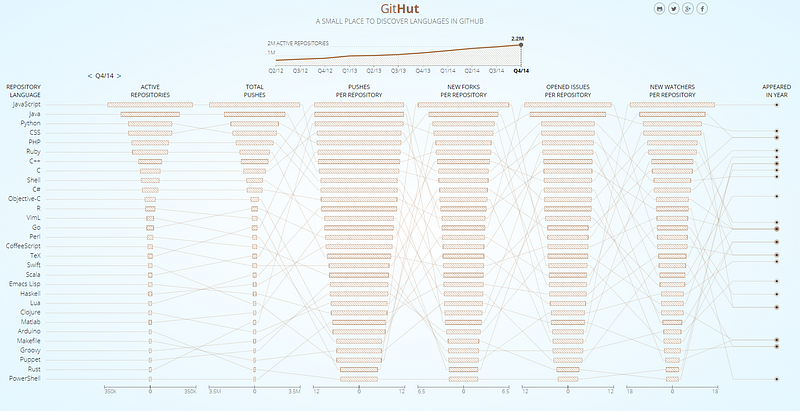
GitHub stats showing how many public repositories there are. https://githut.info/
Since GPT-3 is the most powerful language model that currently exists, they started from there. Using a very similar model, they attacked the second part of the problem, generating code, by training this GPT model on billions of lines of publicly available GitHub code instead of random text from the internet. The power of GPT-3 is pretty much the amount of information it can learn from, so doing the same thing but specialized on code would certainly yield some amazing results. More precisely, they trained this adapted GPT model on 54 million public software repositories hosted on GitHub! Now, we have a huge model trained on a lot of code examples. The problem is, as you know, a model can only be as good as the data it was trained on. So if the data is randomly sampled from GitHub, how can you be sure it works and is well-written? You can’t really know for sure, and it may cause a lot of issues, but a great way they found to improve the coding skills of the model further was to fine-tune it on code from competitive programming websites and from repositories with continuous integration. This means that the code is most likely good and well written but in smaller quantity.
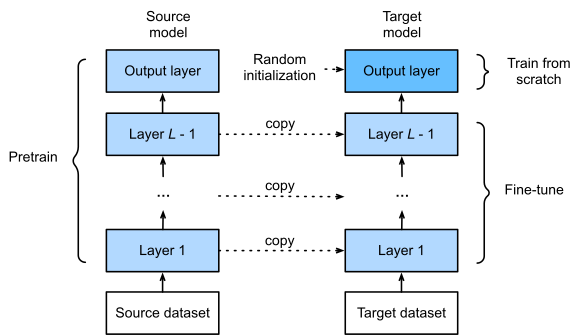
Image from “Dive Into Deep Learning”, Fig. 13.2.1 Fine-tuning. (https://d2l.ai/)
They fine-tuned the model with this new training dataset in a supervised way. This means that they trained the same model a second time on a smaller and more specific dataset of curated examples. Fine-tuning is a powerful technique often used to improve the results for our specific needs instead of starting from nothing. A model is often much more powerful when trained with more data even if it is not useful for our task and further adapted for our task, instead of training a new model from nothing with little curated data. When it comes to data and deep learning, it’s most often the more, the better.
The descendants of this model are what’s used in GitHub Copilot and the Codex models in the OpenAI API. Of course, Copilot is not perfect yet and has many limitations. It won’t replace programmers anytime soon, but it showed amazing results and can speed up the work of many programmers for coding simple but tedious functions and classes. As I mentioned, they trained the copilot’s model on billions of lines of public code, but from any licenses, and since it was made in collaboration with OpenAI, they will, of course, sell this product.

It’s perfectly cool that they want to make money out of a powerful tool they built, but it may have some complications when it was made using your code with restrictive licenses. If you would like to hear more about this issue in relation to copyright law, the GPL license, and terms of service, I’d strongly recommend you watch the great video Yannic Kilcher made a few days ago. It is linked in the references below.
Thank you for reading!
Come chat with us in our Discord community: Learn AI Together and share your projects, papers, best courses, find Kaggle teammates, and much more!
If you like my work and want to stay up-to-date with AI, you should definitely follow me on my other social media accounts (LinkedIn, Twitter) and subscribe to my weekly AI newsletter!
To support me:
- The best way to support me is by being a member of this website or subscribe to my channel on YouTube if you like the video format.
- Support my work financially on Patreon
References:
- GitHub Copilot: https://copilot.github.com/
- Codex/copilot paper: https://arxiv.org/pdf/2107.03374.pdf
- Yannic’s video about GitHub Copilot: https://youtu.be/TrLrBL1U8z0
FAQ
What is GitHub Copilot?
GitHub Copilot is an AI coding assistant that suggests code, completions, tests, and implementation ideas inside a developer workflow.
How can GitHub Copilot help developers?
It can speed up boilerplate, examples, repetitive code, test scaffolds, documentation snippets, and first drafts of simple functions.
What should developers still review?
Review correctness, security, licensing risk, edge cases, performance, dependencies, and whether the code matches the project style.
Can beginners use GitHub Copilot?
Yes, but beginners should run the code, break it, explain it, and compare it with documentation so the assistant does not replace learning.
What is the common mistake with AI coding assistants?
The mistake is accepting code because it looks plausible. The useful workflow is prompt, inspect, test, and revise.